CapCut: Photo & Video Editor Mod

CapCut: Photo & Video Editor Mod APK 16.0.0 [Unlocked][Premium]

Trusted   Update on: 2025-11-18

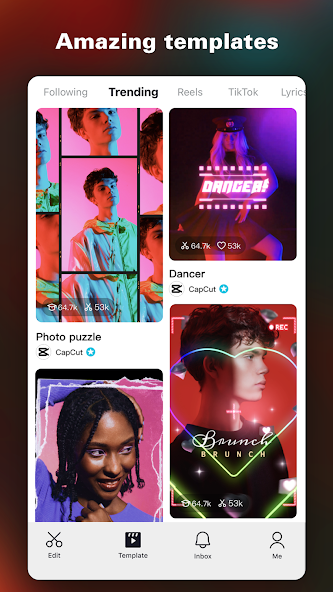
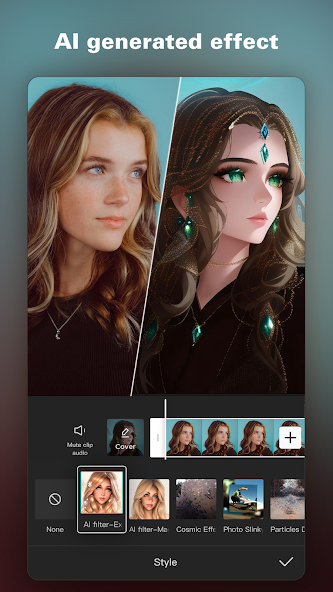
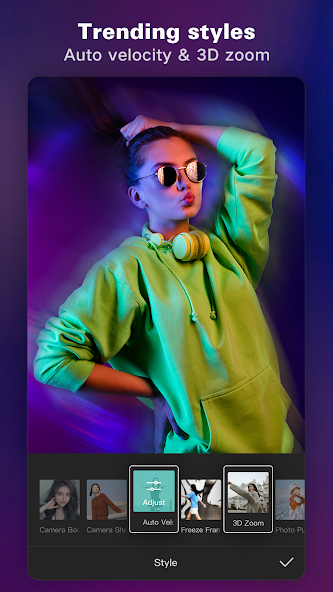
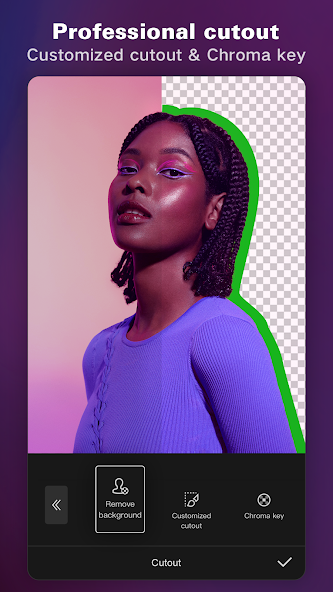
  • CapCut: Photo & Video Editor screenshots
  • CapCut: Photo & Video Editor screenshots
  • CapCut: Photo & Video Editor screenshots
  • CapCut: Photo & Video Editor screenshots
  • CapCut: Photo & Video Editor screenshots
App nameCapCut: Photo & Video Editor Mod APK 16.0.0 [Unlocked][Premium]
Version16.0.0
Update on2025-11-18
Size296.29 MB
Price Free
Rating 4.2
SystemAndroid 6.0 (M)
Mod info Unlocked; Premium
Developer
Category Videoplayers
Get it on Google Play
Download original apk
Share
Download Links:

CapCut: Photo & Video Editor Mod APK 16.0.0 [Unlocked][Premium]

Use HappyMod App to get faster download!
You can still download from this domain (happymod.to) for now, but we strongly recommend switching to our new official domain for future updates and support: Download CapCut: Photo & Video Editor at HappyMod.net.
* All mod apks are uploaded by users. If there is any infringement, please contact us to remove it.

# Mod Info

The main advantages / modifications of CapCut: Photo & Video Editor Mod APK 16.0.0 [Unlocked][Premium]

Mod V1 features:
Pro

Mod V2 features:
1. Premium Unlocked
2. No Login Required
3. Banned countries must use VPN

# Basic Editing

Basic Editing in CapCut is designed to help both beginners and casual creators quickly assemble polished videos without a steep learning curve. At its core, the feature set focuses on essential clip management and timeline operations: trimming, splitting, merging, adjusting clip order, and applying basic speed changes. The interface is mobile-first and intuitive, allowing users to tap and drag to trim footage, drag handles to extend or shorten clips, and use split tools to isolate moments for detailed work. CapCut makes it easy to remove unwanted sections and stitch together highlights, ensuring fast iteration when editing short-form content for platforms like TikTok and Instagram. Beyond simple cuts, Basic Editing supports fine-tuned speed adjustments ranging from dramatic slow motion to fast motion, with numeric input for precise control. The freeze frame tool enables creators to emphasize a single frame for comedic timing or dramatic effect, while built-in transition presets let users add polish between cuts without manual keyframing. For multi-clip projects, the timeline lays out clips in a straightforward horizontal view where users can reorder segments with a long press and drag, preview trims in real time, and layer basic audio tracks. CapCut also includes straightforward export presets and aspect ratio templates tailored to social platforms, so creators can switch from 16:9 to 9:16 or 1:1 with a single tap. The result is a Basic Editing environment that balances power and simplicity: it is accessible enough for a first-time editor to produce a shareable clip in minutes, yet robust enough to handle the common needs of daily social content creation. Consistent UI decisions and contextual guidance reduce friction, helping users focus on storytelling and pacing rather than learning complex controls. Whether you are trimming a vlog, compiling a montage, or preparing a short promotional clip, CapCut Basic Editing helps streamline the entire process from raw footage to a platform-ready video.
  • Trim and Split:Quickly remove unwanted footage with tap-and-drag trims, precise split tools, and real-time preview to isolate the perfect moments
  • Speed Controls:Adjust playback from 0.1x to 100x for slow motion or hyperlapse effects; numeric input supports precise speed tuning
  • Freeze and Highlight:Use freeze frames to emphasize key moments, create comedic beats, or hold a frame for overlay text and graphics
  • Timeline Management:Reorder, merge, and layer clips on a simple horizontal timeline designed for fast assembly and easy preview

# Advanced Editing

Advanced Editing in CapCut elevates the mobile editing experience by providing power-user tools that were traditionally limited to desktop editors. Keyframe animation enables detailed control over position, scale, rotation, opacity, and other clip parameters over time, allowing creators to craft smooth motion, custom zooms, and cinematic pans with ease. CapCut supports optical flow-based slow motion, which analyzes motion between frames to produce natural, fluid slowdowns without jitter or ghosting, a major advantage for action footage and cinematic sequences. The chroma key tool unlocks green screen compositing directly on the device, with controls for tolerance and edge feathering so subjects can be isolated cleanly and placed over custom backgrounds, animated clips, or layered effects. For projects with multiple visual layers, CapCut offers a multi-track timeline where users can arrange video, audio, overlays, stickers, and text independently; this facilitates complex edits like picture-in-picture, split screens, and layered transitions. Stabilization helps salvage shaky handheld footage by automatically smoothing camera movement while preserving important framing. Speed curve tools enable refined timing adjustments that make motion feel organic: ease-in and ease-out curves let editors shape acceleration through a clip rather than relying on linear speed changes. The export engine supports high-resolution outputs, including 4K at 60fps, and lets users preserve frame rates and color detail for professional delivery. Advanced Editing also integrates non-destructive workflows, so clips and applied effects can be adjusted without redoing earlier steps. CapCut balances accessibility with depth: interface cues and contextual controls guide users while advanced options remain available for those who want granular control. For content creators aiming for cinematic looks or sophisticated motion design, CapCut delivers a surprisingly capable suite of advanced editing tools on mobile and desktop, enabling production-quality results without the overhead of a full editing workstation.
  • Keyframe Animation:Animate position, scale, rotation, and opacity over time to create dynamic motion and cinematic camera moves
  • Optical Flow Slow Motion:Generate smooth slow-motion by interpolating frames for fluid motion without artifacts
  • Chroma Key Compositing:Remove green or other solid backgrounds with tolerance and feather controls to composite subjects onto new scenes
  • Multi-track Timeline:Arrange video, audio, text, and overlays across multiple tracks for complex layered edits and picture-in-picture

# Intelligent Features

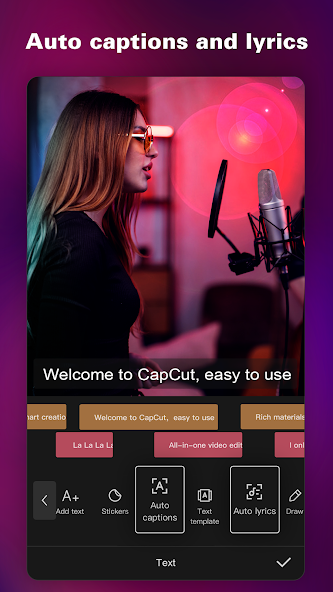
CapCut's Intelligent Features leverage automation and machine-driven tools to speed up workflows and expand creative possibilities. Auto captions automatically transcribe spoken words to on-screen subtitles using speech recognition, saving hours of manual captioning and improving accessibility and engagement on social platforms. The transcription is editable, letting users correct errors, adjust timing, and choose subtitle styles that match their brand. Text-to-speech converts typed text into natural-sounding voiceovers with multiple languages and voice options, providing a quick way to add narration, character voices, or multilingual accessibility without recording audio. Motion tracking automatically follows a subject through the frame and attaches text, stickers, or effects to that subject, creating seamless interactions like follow-labels, target highlights, or reactive graphics that maintain alignment even as the subject moves. Background removal automates subject extraction, isolating people or objects from backgrounds without manual masking; this accelerates compositing workflows and enables creative swaps like placing a subject in stylized backdrops or animated environments. Intelligent background removal pairs well with templates and effects to rapidly iterate creative looks. These features are optimized for speed and usability: default presets, quick-edit controls, and inline previews let creators apply AI-driven tools with minimal configuration while still offering adjustments for accuracy and style. Together, the intelligent toolset reduces repetitive tasks, helps those without specialized skills achieve polished results, and opens up new editing strategies, such as rapid captioned clips for social, text-driven voiceover experiments, and personalized motion-tracked overlays. By integrating smart automation directly into the editing flow, CapCut empowers creators to spend more time on storytelling and creative direction rather than manual technical chores.
  • Auto Captions:Automatically transcribe speech into editable subtitles to save time and improve video accessibility
  • Text-to-Speech:Generate natural voiceovers in multiple languages and voices for narration or multilingual content without recording
  • Motion Tracking:Track subjects and attach text, stickers, or effects that follow movement for dynamic, polished results
  • Background Removal:Quickly extract subjects from backgrounds for easy compositing and creative scene swaps

# Text & Stickers

Text & Stickers in CapCut provide a flexible and creative approach to adding on-screen messaging, branding, and personality to video projects. The app includes a vast selection of fonts and text templates that can be applied with one tap, enabling users to match the tone of their content, whether it is playful, cinematic, or professional. Fonts can also be imported locally, giving creators full control over typography and brand consistency. Text elements are highly customizable: size, color, outline, shadow, spacing, and animation presets can be adjusted to create legible and attractive captions, lower thirds, or title sequences. Templates for kinetic text and subtitle styles help maintain rhythm and visual interest, especially for short-form social content where text often carries much of the storytelling. Stickers and emoji overlays add another layer of expression; CapCut offers trending sticker packs and animated assets that can be scaled, rotated, and keyed to motion via tracking. Subtitles in CapCut can be placed directly on the timeline as movable clips, allowing creators to align captions to specific moments and edit multiple subtitle blocks at once for efficient localization. The timeline-aware text workflow supports nested edits and preserves timing as clips are shifted, making it easy to update copy late in the editing process without breaking the layout. For creators who rely on consistent visual identity, capabilities like saved text styles and reusable templates reduce setup time and ensure every video adheres to a brand look. Whether you need punchy captions for vertical video, cinematic titles for a short film, or playful stickers for a reaction clip, CapCut's Text & Stickers tools give you a robust, accessible toolkit for integrating text and graphics in ways that amplify your message and keep viewers engaged.
  • Custom Fonts:Import local fonts or choose from the built-in library to maintain brand identity and typographic consistency
  • Animated Text Templates:Apply kinetic text effects and subtitle templates to add motion and rhythm to on-screen copy
  • Stickers and Overlays:Use trending animated stickers and emojis, resize and animate them, or attach them to tracked subjects
  • Subtitle Timeline:Place and edit subtitles as timeline clips for precise timing, batch adjustments, and easy localization

# Effects & Filters

Effects & Filters in CapCut offer a broad palette for transforming the mood, style, and visual impact of video content. The app regularly updates its library with trending effects, ensuring creators have access to current aesthetic motifs that perform well on social platforms. Core filters allow quick color grading adjustments, such as contrast, exposure, saturation, and tint, while movie-style presets provide instant cinematic looks that can be further fine-tuned. Creative effects include glitch, blur, 3D transforms, light leaks, and vintage film treatments, enabling both subtle enhancement and bold stylistic choices. Effects can be layered and blended, providing nuanced control over how an effect interacts with footage; blend modes and opacity sliders enable composite looks without destructive edits. Transition effects help smooth or stylize cuts between clips, from simple wipes and fades to dynamic zooms and motion-matched transitions that maintain energy across a sequence. For more advanced compositing, CapCut supports masking and localized effects so visual changes can be applied only to specific regions of a frame. The platform also provides preset packs and weekly updates to keep the effect library fresh and aligned with platform trends, which helps creators stay relevant and experiment with novel aesthetics. Previews and adjustable parameters make it easy to iterate: users can quickly audition different filters and stack effects to discover unique combinations. Whether the goal is a consistent cinematic grade, a viral retro glitch, or polished brand color correction, CapCut's Effects & Filters toolbox supplies the creative building blocks and flexible controls necessary to craft distinct visual identities and keep video content visually engaging across channels.
  • Color Grading:Apply exposure, contrast, saturation, and tint adjustments or use cinematic presets to establish a consistent visual tone
  • Creative Effects:Use glitch, 3D, blur, and vintage effects to create stylized looks and eye-catching visual moments
  • Transitions Library:Add dynamic and trend-driven transition effects to maintain pacing and energy between clips
  • Localized Masks:Apply effects to selected areas with masks for selective grading and creative compositing

# Music & Export

Music & Export in CapCut streamlines the final stages of video production, providing easy access to millions of music clips and sound effects along with flexible export options tailored to social sharing and high-quality delivery. The built-in audio library contains a mix of trending tracks, sound effects, and royalty-cleared music suitable for short-form and long-form content. Creators can search by mood, genre, and tempo, preview tracks in context, and add them to the timeline with precise in/out trimming. CapCut supports audio extraction from video clips, allowing editors to repurpose dialogues, ambient sounds, or music from footage as separate tracks. Basic audio tools include volume envelopes, ducking for voiceover clarity, and simple equalization to balance frequencies. Once the edit is complete, CapCut offers export settings that accommodate a range of needs: choose aspect ratios and resolutions, enable smart HDR, and export in HD up to 4K at 60fps for platforms that support high frame rates. Presets simplify preparing videos for TikTok, Instagram, YouTube, WhatsApp, and Facebook by automatically adjusting format, bitrate, and resolution. The app also supports various codecs and lets users set custom quality parameters for professional delivery. Fast rendering and background export keep workflows efficient, while options to save templates and export project files make collaboration and iterative publishing easier. Sharing is integrated, enabling one-tap uploads to social apps or local saves for later distribution. Overall, Music & Export combines a rich audio ecosystem with robust output controls to ensure your finished videos sound great and meet platform-specific technical standards.
  • Audio Library:Access trending, royalty-cleared music and sound effects searchable by mood, genre, and tempo for quick soundtrack selection
  • Audio Tools:Extract audio from clips, adjust volume envelopes, use ducking, and apply basic EQ to balance voice and music
  • Export Presets:Choose platform-specific presets and custom resolutions including 4K60fps with smart HDR to match distribution requirements
  • Quick Sharing:Render efficiently and share directly to social platforms or save high-quality files locally for distribution

# What're users talking about CapCut: Photo & Video Editor Mod APK

Download HappyMod to join real time talk with millions of users.

  • User reviews
  • User requests

Write a review for CapCut: Photo & Video Editor Mod APK

Rate it:

Average rating out of 262

4.2
Submit a review

User reviews (262)

P

@Anonymous   2025-12-08 02:57:51

From:PH   Device:CPH2179   OS:android 10
great app and very useful

I

@Anonymous   2025-12-08 00:17:02

From:IN   Device:V2205   OS:android 14
Good not a scam u can freely use the app with out any ads

P

@Anonymous   2025-12-07 23:47:36

From:PH   Device:SM-A125F   OS:android 10
this mode apps is so good

Z

@Anonymous   2025-12-07 21:08:38

From:ZW   Device:itel A667L   OS:android 14
amazing but why is my account reject

I

@Anonymous   2025-12-07 19:54:29

From:IN   Device:Redmi 8A   OS:android 10
Capcut is very very good

I

@Anonymous   2025-12-07 19:43:54

From:IN   Device:SM-X110   OS:android 15
good and smooth network

I

@Anonymous   2025-12-07 15:42:43

From:IN   Device:V2204   OS:android 12
I love Capcut editor

P

@Anonymous   2025-12-07 10:04:23

From:PK   Device:23129RN51X   OS:android 15
hi friends,it's working great ?

S

@Anonymous   2025-12-07 10:00:49

From:SA   Device:FOA-LX9   OS:android 12
Edit the link to get started on the

I

@Anonymous   2025-12-07 03:53:07

From:IN   Device:CPH2531   OS:android 15
capcut good work amazing

R

@Anonymous   2025-12-07 02:15:38

From:RO   Device:23124RA7EO   OS:android 14
this apk works amazingly except for one bug but it's still amazing!!! 10/10!!!

I

@Anonymous   2025-12-07 01:26:50

From:IN   Device:CPH2603   OS:android 15
thank you for giving me this app

I

@Anonymous   2025-12-06 14:52:12

From:IN   Device:23124RN87I   OS:android 13
nice it's useful for a editor who lives in india

P

@Anonymous   2025-12-06 13:25:30

From:PK   Device:Infinix X6532C   OS:android 14
NICE ? APP BUT BLUR FILTER IS NOT WORKING ?

P

@Anonymous   2025-12-06 13:19:44

From:PK   Device:Infinix X6731B   OS:android 14
"CapCut is very good"

I

@Anonymous   2025-12-06 10:33:08

From:ID   Device:CPH2113   OS:android 12
wow soo good that it showed ts?

P

@Anonymous   2025-12-06 00:42:25

From:PK   Device:V2027   OS:android 12
ALL FEATURE ARE WORKING BUT ONE PROBLEM AI CLIPPER IS NOT WORKING ?

I

@Anonymous   2025-12-05 23:29:31

From:IN   Device:Infinix X675   OS:android 11
network issue aap is not working properly

P

@Anonymous   2025-12-05 21:11:30

From:PK   Device:Infinix X6728B   OS:android 15
100% working and pro version bhi Sahi kam karta hai main kahin barso se dhundh raha tha cap cut pro mujhe nahin mila FIR mujhe yad aaya happy mood Jara hai

N

@Anonymous   2025-12-05 15:26:03

From:NP   Device:SM-A105F   OS:android 11
very nice ? capcut video editor

More...[+]

Request a latest version of CapCut: Photo & Video Editor Mod

If this mod doesn't work, you can send a request to HappyMod community. Users will upload a new mod if they've one.
Send a request

Latest requests related to CapCut: Photo & Video Editor

U

@Anonymous   2023-03-29 05:26:07

From:US   Device:Xiaomi 220333QL   OS:android 11
jajjajsjskajjsjejkaohaoskkdbsoalkdbksnalkalsjbkslakajakbzkxn

U

@Anonymous   2023-03-28 17:13:41

From:US   Device:LAVA LAVA LH9931   OS:android 9
I need access to all the features to make the videos

E

@Anonymous   2023-03-26 14:34:00

From:ES   Device:motorola moto g(8) plus   OS:android 10
todo desbloqueado por favor, para la última versión si es posible

G

@Anonymous   2023-03-25 21:34:49

From:GB   Device:HUAWEI ALE-L21   OS:android 6.0
Im don't like that I didn't understand why he didn't work

E

@Anonymous   2023-03-25 06:19:07

From:ES   Device:samsung SM-A035M   OS:android 12
lrmgkdkdkdkdkksndyFkihw[^#¥€●

G

@Anonymous   2023-03-23 14:15:37

From:GB   Device:OPPO CPH1909   OS:android 8.1.0
I request a mod that pro unlocked so you can make edits better

U

@Anonymous   2023-03-23 02:51:05

From:US   Device:TCL Alcatel_5002R   OS:android 10
EVERYTHING UNLOCKED EVERYTHING UNLOCKED EVERYTHING UNLOCKED

I

@Anonymous   2023-03-19 14:36:36

From:IN   Device:samsung SM-A135F   OS:android 13
need new version bro can't get much from older versions

U

@Anonymous   2023-03-10 09:06:07

From:US   Device:motorola moto g(7) plus   OS:android 10
Por favor hagan una versión con premium desbloqueado y sin marca de agua

I

@Anonymous   2023-03-07 22:11:30

From:ID   Device:INFINIX MOBILITY LIMITED Infinix X680B   OS:android 10
pingin yang PREMIUM 7.7.0 k ididid eieueue eiieieue72827@!)9-;3))8

M

@Anonymous   2023-03-03 10:28:41

From:MX   Device:HUAWEI STK-LX3   OS:android 10
Necesito descargar la aplicación para poder editar

I

@Anonymous   2023-03-03 08:38:41

From:IN   Device:Xiaomi M2101K7BI   OS:android 12
Don't use VPN.all file mod under the capcut mod apk. and I don't want to use vpn.i want to use offline app

U

@Anonymous   2023-02-28 05:06:26

From:US   Device:samsung SM-S901U   OS:android 13
hola comodidad de happymod quería decir que la app está bien pero podría ponerla en la última Actualización con las nuevas funciones pro de capcut eso sería genial gracias por leer.

B

@Anonymous   2023-02-27 07:40:27

From:BR   Device:samsung SM-T113NU   OS:android 4.4.4
quero instalar esse aplicativo mas nao tenho em meu dispositivo

G

@Anonymous   2023-02-24 22:33:59

From:GB   Device:Xiaomi M2007J20CG   OS:android 12
please make a mod for PRO unlocked it's so hard to edit without PRO tbh

M

@Anonymous   2023-02-21 23:34:59

From:MM   Device:OPPO CPH2365   OS:android 12
WTF:⁠-⁠):⁠-⁠):⁠-⁠):⁠-⁠):⁠-⁠):⁠-⁠):⁠-⁠):⁠-⁠):⁠-⁠):⁠-⁠):⁠-⁠):⁠-⁠):⁠-⁠):⁠-⁠):⁠-⁠):⁠-⁠):⁠-⁠):⁠-⁠):⁠,⁠-⁠):⁠-⁠):⁠,⁠-⁠):⁠-⁠):⁠,⁠-⁠):⁠,⁠-⁠):⁠,⁠-⁠):⁠,⁠-⁠):⁠,⁠-⁠):⁠,⁠-⁠):⁠,⁠-⁠):⁠,⁠-⁠):⁠,⁠-⁠):⁠,⁠-⁠):⁠,⁠-⁠):⁠,⁠-⁠):⁠,⁠-⁠):⁠,⁠-⁠):⁠,⁠-⁠):⁠,⁠-⁠):⁠,⁠-⁠):⁠,⁠-⁠):⁠,⁠-⁠):⁠,⁠-⁠):⁠,⁠-⁠):⁠,⁠-⁠):⁠,⁠-⁠):⁠,⁠-⁠):⁠,⁠-⁠):⁠,⁠-⁠):⁠,⁠-⁠):⁠,⁠-⁠):⁠,⁠-⁠):⁠,⁠-⁠):⁠,⁠-⁠):⁠,⁠-⁠):⁠,⁠-⁠):⁠,⁠-⁠):⁠,⁠-⁠):⁠,⁠-⁠):⁠,⁠-⁠):⁠,⁠-⁠):⁠,⁠-⁠):⁠,⁠-⁠):⁠,⁠-⁠):⁠,⁠-⁠):⁠,⁠-⁠):⁠,⁠-⁠):⁠,⁠-⁠):⁠,⁠-⁠):⁠,⁠-⁠):⁠,⁠-⁠):⁠,⁠-⁠):⁠,⁠-⁠):⁠,⁠-⁠):⁠,⁠-⁠):⁠,⁠-⁠):⁠,⁠-⁠):⁠,⁠-⁠):⁠,⁠-⁠):⁠,⁠-⁠):⁠,⁠-⁠):⁠,⁠-⁠:⁠,⁠-⁠):⁠,⁠-⁠)):⁠,⁠-⁠):⁠,⁠-⁠):⁠,⁠-⁠):⁠,⁠-⁠):⁠,⁠-⁠):⁠,⁠-⁠):⁠,⁠-⁠):⁠,⁠-⁠):⁠,⁠-⁠):⁠,⁠-⁠):⁠,⁠-⁠):⁠,⁠-⁠):⁠,⁠-⁠):⁠,⁠-⁠):⁠,⁠-⁠):⁠,⁠-⁠):⁠,⁠-⁠):⁠,⁠-⁠):⁠,⁠-⁠):⁠,⁠-⁠):⁠,⁠-⁠):⁠,⁠-⁠):⁠,⁠-⁠):⁠,⁠-⁠):⁠,⁠-⁠):⁠,⁠-⁠):⁠,⁠-⁠):⁠,⁠-⁠):⁠,⁠-⁠):⁠,⁠-⁠):⁠,⁠-⁠):⁠,⁠-⁠):⁠,⁠-⁠):⁠,⁠-⁠):⁠,⁠-⁠):⁠,⁠-⁠):⁠,⁠-⁠):⁠,⁠-⁠):⁠,⁠-⁠):⁠,⁠-⁠)

B

@Anonymous   2023-02-20 09:31:35

From:BR   Device:samsung SM-A013M   OS:android 10
uma fotinha minha ksksk,sla n instalou ainda ,abaixei pra tipografia ,Jae ,

U

@Anonymous   2023-02-12 09:05:22

From:US   Device:samsung SM-A035F   OS:android 11
No watermark and version 7.7.0 and alot of more mods for this mod

I

@Anonymous   2023-02-04 14:40:52

From:ID   Device:INFINIX MOBILITY LIMITED Infinix X650C   OS:android 9
please update apk capcut new version, wait new version now

U

@Anonymous   2023-02-01 20:32:10

From:US   Device:motorola moto g fast   OS:android 11
can you make premium AND pro, please?

More...[+]

Logo

HappyMod

Best mod downloader
for 100% working mods.

CapCut: Photo & Video Editor Mod apk ~ download faster with HappyMod.

Other Versions

Found (105) versions of CapCut: Photo & Video Editor Mod

CapCut - Video Editor Mod Apk [Unlocked][Premium]

CapCut - Video Editor Mod Apk [Unlocked][Premium]

1. Premium Unlocked
2. No Login Required
3. Banned countries must use VPN
CapCut - Video Editor Mod Apk [Paid for free][Unlocked][Pro][Optimized]

CapCut - Video Editor Mod Apk [Paid for free][Unlocked][Pro][Optimized]

● Pro
Paid Features Unlocked
● Stable mod
● AI features working
● All templates working
● Business creator mode
● Security notice removed
● Multiple languages available
● Regional restrictions removed
● Requires android 8 and up
● CPUs arch: armeabi-v7a, arm64-v8a
● Optimized and cleaned resources
for fast loading.
CapCut - Video Editor Mod Apk [Paid for free][Unlocked][Pro][Optimized]

CapCut - Video Editor Mod Apk [Paid for free][Unlocked][Pro][Optimized]

● Pro
Paid Features Unlocked
● Stable mod
● AI features working
● All templates working
● Business creator mode
● Security notice removed
● Multiple languages available
● Regional restrictions removed
● Requires android 10 and up
● CPUs arch: armeabi-v7a, arm64-v8a
● Optimized and cleaned resources
for fast loading.

CapCut - Video Editor Mod Apk [Paid for free][Unlocked][Pro][Optimized]

● Pro
Paid Features Unlocked
● Stable mod
● AI features working
● All templates working
● Business creator mode
● Security notice removed
● Multiple languages available
● Regional restrictions removed
● Requires android 5.0+ and up
● CPUs arch: armeabi-v7a, arm64-v8a
● Optimized and cleaned resources

CapCut - Video Editor Mod Apk [Paid for free][Unlocked][Pro][Optimized]

● Pro
Paid Features Unlocked
● Stable mod
● Export issue fixed
● All templates working
● Business creator mode
● No internet connection error
● Multiple languages available
● Regional restrictions removed
● No active trackers or advertisements
● Requires android 5.0+ and up
● CPUs arch: armeabi-v7a, arm64-v8a
● Optimized and cleaned resources

CapCut - Video Editor Mod Apk [Paid for free]

Open all the features of the paid version.
The app without ads.
Save videos in high quality.
Without a watermark.

CapCut - Video Editor Mod Apk [Unlocked][Pro]

-Pro Unlocked
-Library,effects and filters working tested
-Spoof version for avoiding updates

More...[+]

Related Mods

People who download CapCut: Photo & Video Editor Mod also like...

Battery Calibration Mod Apk [Remove ads]

Battery Calibration Mod Apk [Remove ads]

Ads Removed [Donation]
Easy To use Battery Calibration App
Battery Calibration - 2020
Easy to use battery calibration tool
just follow the instructions .
-Nice UI
-Works For Non-Root Devices(With Extra Steps)
-Easy To use
-Battery Monitor Service (BETA)
-Battery Saving Tips
-Includes Script To Give Necessary Permissions
It Is Recommended To Calibrate At 100%
The application supports root and non-root device!︎ ︎ ︎ ︎ ︎ ︎ ︎ ︎ ︎ ︎ ︎ ︎ ︎ ︎ ︎ ︎ ︎ ︎︎ ︎ ︎ ︎ ︎ ︎ ︎ ︎ ︎ ︎ ︎ ︎ ︎ ︎ ︎ ︎ ︎ ︎︎ ︎ ︎ ︎ ︎ ︎ ︎ ︎ ︎ ︎ ︎ ︎ ︎ ︎ ︎ ︎ ︎ ︎︎ ︎ ︎ ︎ ︎ ︎ ︎ ︎ ︎ ︎ ︎ ︎ ︎ ︎ ︎ ︎ ︎ ︎︎ ︎ ︎ ︎ ︎ ︎ ︎ ︎ ︎ ︎ ︎ ︎ ︎ ︎ ︎ ︎ ︎ ︎︎ ︎ ︎ ︎ ︎ ︎ ︎ ︎ ︎ ︎ ︎ ︎ ︎ ︎ ︎ ︎ ︎ ︎︎ ︎ ︎ ︎ ︎ ︎ ︎ ︎ ︎ ︎ ︎ ︎ ︎ ︎ ︎ ︎ ︎ ︎︎ ︎ ︎ ︎ ︎ ︎ ︎ ︎ ︎ ︎ ︎ ︎ ︎ ︎ ︎ ︎ ︎ ︎︎ ︎ ︎ ︎ ︎ ︎ ︎ ︎ ︎ ︎ ︎ ︎ ︎ ︎ ︎ ︎ ︎ ︎︎ ︎ ︎ ︎ ︎ ︎ ︎ ︎ ︎ ︎ ︎ ︎ ︎ ︎ ︎ ︎ ︎ ︎︎ ︎ ︎ ︎ ︎ ︎ ︎ ︎ ︎ ︎ ︎ ︎ ︎ ︎ ︎ ︎ ︎ ︎︎ ︎ ︎ ︎ ︎ ︎ ︎ ︎ ︎ ︎ ︎ ︎ ︎ ︎ ︎ ︎ ︎ ︎︎ ︎ ︎ ︎ ︎ ︎ ︎ ︎ ︎ ︎ ︎ ︎ ︎ ︎ ︎ ︎ ︎ ︎︎ ︎ ︎ ︎ ︎ ︎ ︎ ︎ ︎ ︎ ︎ ︎ ︎ ︎ ︎ ︎ ︎ ︎︎ ︎ ︎ ︎ ︎ ︎ ︎ ︎ ︎ ︎ ︎ ︎ ︎ ︎ ︎ ︎ ︎ ︎︎ ︎ ︎ ︎ ︎ ︎ ︎ ︎ ︎ ︎ ︎ ︎ ︎ ︎ ︎ ︎ ︎ ︎︎ ︎ ︎ ︎ ︎ ︎ ︎ ︎ ︎ ︎ ︎ ︎ ︎ ︎ ︎ ︎ ︎ ︎︎ ︎ ︎ ︎ ︎ ︎ ︎ ︎ ︎ ︎ ︎ ︎ ︎ ︎ ︎ ︎ ︎ ︎︎ ︎ ︎ ︎ ︎ ︎ ︎ ︎ ︎ ︎ ︎ ︎ ︎ ︎ ︎ ︎ ︎ ︎︎ ︎ ︎ ︎ ︎ ︎ ︎ ︎ ︎ ︎ ︎ ︎ ︎ ︎ ︎ ︎ ︎ ︎
Guardiões da Âncora Mod Apk [Unlimited money]

Guardiões da Âncora Mod Apk [Unlimited money]

A lot of money, to restart the game after you complete the tutorial can be obtained.
You can use currency in the main screen, click on the ship icon
Swap-Swap Panda Mod Apk

Swap-Swap Panda Mod Apk

Without advertising

More...[+]

Other Apps from this developer

Explore more great apps from the same developer...

CapCut - Video Editor Mod Apk 16.0.0 [Unlocked][Premium]

CapCut - Video Editor Mod Apk 16.0.0 [Unlocked][Premium]

1. Premium Unlocked
2. No Login Required
3. Banned countries must use VPN
Hypic - Photo Editor & AI Art Mod Apk 7.6.0 [Unlocked][Premium]

Hypic - Photo Editor & AI Art Mod Apk 7.6.0 [Unlocked][Premium]

1. Premium Unlocked
2. No Watermark
3. All Features unlocked